
TL;DR: Successful LED screen rentals depend as much on venue preparation as they do on the screen itself. Planning for power, access, placement, visibility, content, and event-day support ahead of time helps prevent delays, safety concerns, and costly last-minute adjustments.
Key Takeaways:
A great LED screen can elevate an event, but many venues overlook LED screen rental requirements until major event plans are already set. This often leads to avoidable issues like limited access, inadequate power, or poorly formatted content.
The best way to avoid these problems is to prepare the venue before confirming the rental. Venues should know where the screen will go and what it needs before event day.
LED screens are often treated as plug-and-play equipment, but many venues underestimate the planning they require. Larger LED screens require careful planning for power, placement, visibility, content, and setup logistics long before installation day.
An LED screen impacts things like stage setup, power, access, safety, and event timing. If those pieces are not discussed early, the screen can become a last-minute stress point instead of a visual upgrade.
A rental provider can recommend the right setup when the venue shares details like the location, audience size, viewing distance, content, and schedule. Without them, pricing, screen sizing, and placement mistakes are more likely, often leading to last-minute changes.
Waiting too long often means making compromises, such as using a smaller screen, accepting poor sightlines, or working around outdoor setup limitations. Planning earlier gives the event team more options and fewer headaches.
Before talking about size, panels, or pricing, the venue should define the screen’s purpose. An LED screen for a keynote presentation has different needs than one used for concerts, live feeds, sponsor ads, movies, or watch parties.
The screen’s purpose affects key rental decisions, including visibility, content, brightness, and setup needs. A sponsor display may only need looping branded content, while a festival screen often requires higher brightness and outdoor-ready setup.
Audience size matters, but viewing distance and audience behavior often matter more. Venues should consider where people will gather and how often they will watch the screen, since both affect placement and visibility.
Venues should identify all planned screen content in advance, including:
Doing so helps ensure the content is formatted correctly for the screen layout and remains clear, professional, and easy to view from anywhere in the venue.
Photos help, but they do not replace measurements. A venue should measure the screen area before approving a rental plan, especially for stage, ballroom, suspended, or high-traffic placements.
The rental team needs key measurements, surface details, and obstacle information. Without those details, the setup can become a guessing game.
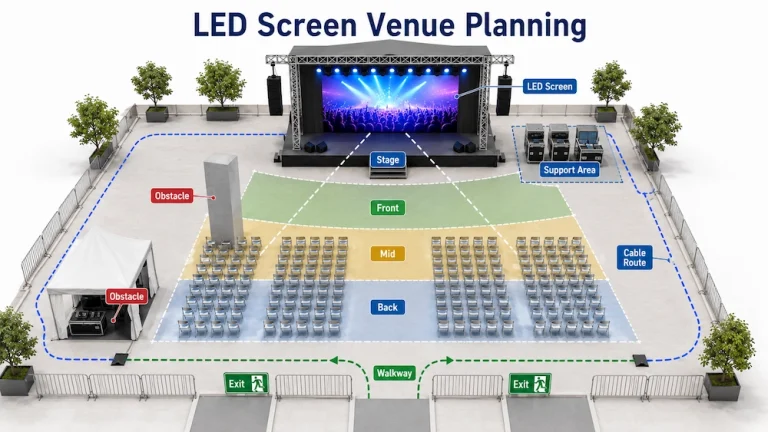
The screen needs space for support equipment, trailer clearance, and proper stage depth. Venues should also ensure the floor is level and strong enough, since setup conditions vary by location.
A screen is only effective if attendees can see it, so before walking the venue from the audience’s perspective, check for potential sightline obstacles such as:
Power is one of the most important LED screen rental requirements, yet it is often handled casually. Venues may know where outlets are, but not whether they can safely power the screen and other event equipment.
An LED screen may share power with audio, lighting, vendors, registration equipment, livestream gear, and charging stations. Combined power demand can add quickly, so it is important to verify capacity before setup begins.
The venue should know where power is available, who controls access, and whether generator power is needed. Accurate power details help ensure a safe, efficient setup.
Cable distance matters because power cables can create hazards when routed through walkways, entrances, driveways, or wet areas. Plan routes away from traffic areas, emergency exits, ADA pathways, and vendor spaces to keep the setup safe and organized.
A venue may have plenty of event space, but unclear access routes, loading areas, or parking can delay setup. LED screen rentals often involve large equipment, so clear access planning helps keep installation on schedule.
Delays often happen when crews must sort out access logistics after arrival. Providing clear access details ahead of time helps keep setup on schedule and reduces unnecessary stress.
Venues should provide clear load-in instructions to avoid delays, especially at large properties like event complexes. Key information should include:
The screen may need space for unloading assembly, testing, and equipment storage before setup. Plan this area in advance so it is not occupied by guests, vendors, caterers, decorators, or other event teams.
A screen can be installed correctly and still disappoints if the content is not ready. Blurry logos, stretched videos, low-resolution sponsor ads, and unreadable slides can make a professional display look poorly planned.
The venue should collect content early, especially from sponsors, speakers, performers, or outside contributors. Early deadlines allow time to review materials, fix issues, and avoid last-minute surprises on event day.
Content should match the screen format, and the rental provider can advise resolution, aspect ratio, file requirements, and playback settings. This is especially important for sponsor content, which should have clear deadlines to prevent last-minute issues.
The event team should confirm which device will feed the screen, whether it is a laptop, media player, camera system, livestream setup, or another source. A quick test beforehand can catch connection, audio, playback, or display issues before the audience sees them.
One common mistake is assuming someone else is responsible for running the LED screen, whether it is the venue, event planner, rental team, or presenter. When ownership is unclear, simple issues can quickly turn into delays during the event.
Venues should confirm whether the rental includes setup only or on-site technical support, as these are different services. Basic playback may need only setup, while live presentations or camera feeds often require on-site support.
Assign one primary contact for access, screen placement, and event-day decisions. Larger events may also need content and technical contacts. Clear responsibilities help prevent confusion when plans change.
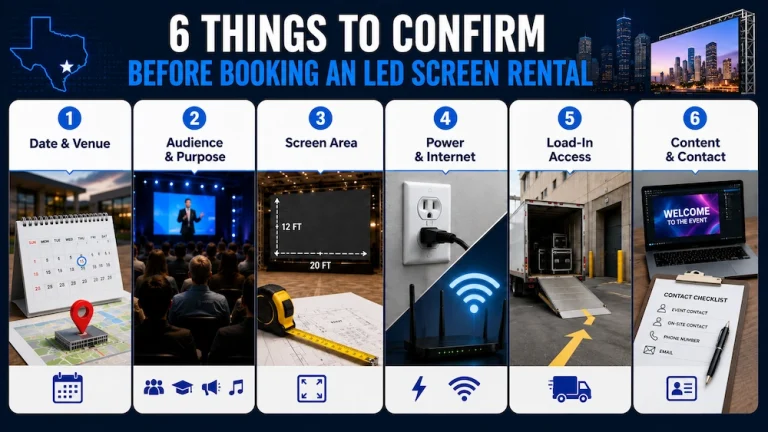
Before confirming an LED screen rental, prepare a simple checklist that includes:
Providing these details upfront helps ensure the right screen, setup, and support plan for your event.
LED Partners helps venues and event organizers plan LED screen rentals before event day. The team considers key factors such as the event date, venue layout, viewing distance, power needs, and support requirements to ensure the right setup.
For Houston-area events across Texas, LED Partners provides LED screen rentals for corporate events, schools, churches, fundraisers, and community gatherings. Their team helps venues select the right screen setup and support for a smooth event.
Don’t wait until load-in day to discover setup issues. The best LED screen rentals start with clear planning, and that planning begins before the quote is finalized.